We launched our new XtraNet product yesterday and there was a short interview about the new service over at the Cabume website. It was great to answer some actual questions rather than just issue a press release.
I liked the Q&A format so much I thought I’d keep it going a bit longer and ask myself some questions.
The first one might be a question asked by an existing CogniDox customer.
Q. In what way is it new? Hasn’t CogniDox always had extranet functionality?
It’s true that CogniDox has built-in features for publishing documents to external web portals for customer download according to license entitlements. But building the infrastructure required to do that has been the responsibility of any company wanting to use the features. For some that’s the way they want it, their IT department will take responsibility. But for many it was a step too far to build the partner website or customer portal. XtraNet is a separate product for that, suitable for new or existing CogniDox users. If you are an existing CogniDox user then we’ll set up an virtual private cloud instance for you and point your in-house system to it. Then we hand over a URL address (something along the lines of partner.yourcompany.com) that you can share with customers and partners. You’ll get a better price than non-customers too, because you already have licenses.
The second one could be a question arising from the screenshot in the Cabume piece – will all instances of XtraNet look more or less the same as that?
Q. What would such a website look like?
Let’s first assume you want something entirely new, not based on your current branding. You could choose a Joomla template from one of the many free options or pay $15 to $75 for a commercial template. A template is a collection of files that create the layout (formatting) and look (graphic styling) of a website. Joomla is mentioned because many templates available for it are designed specifically for businesses and will be professional-looking designs. So, for example, to build the screenshot that featured in the Cabume article we went to http://www.siteground.com/joomla-templates.htm, applied the “business” filter to reduce the number of choices, and selected a free template designed by 123WebDesign. We download the zip file, install it and customize it by integrating the CogniDox plug-in functionality (and a few other branding tweaks, such as a site name). Now all the documents licensed and published in CogniDox are ‘flowing’ into the template that we chose. Typically we can go from starting point to a working website in under an hour.
But most companies won’t be starting from scratch. They’ll have a corporate brand and a public website designed by a web design company and maybe a graphic designer. That’s fine. We’re really only interested in the styling of the site so we’ll borrow its styling e.g. colours, backgrounds, etc for the XtraNet site, so that effectively we have a blank page in the style of the original website. We’ll put that into a Joomla template and it’s as above from there.
That’s twice now I’ve mentioned Joomla. You can see that we’re using it extensively for this phase of the XtraNet product lifecycle. The roadmap plan is to add WordPress next. To make that clearer, we can take an existing WordPress-based website and extract its style elements, but we won’t be basing the XtraNet website on WordPress at this time.
There are probably a lot more questions to answer, but that’s a start.
If you are interested in trying out XtraNet we can provide a 30 day free trial. Let us know by filling in theweb form on the signup page.
Recently we announced a case study with a partner, Primilis, in which they used a CogniDox feature to implement a Graphical Quality Management System (G-QMS). It’s available to download (no registration required) in PDF format from http://www.cognidox.com/graphical-qms-case-study.
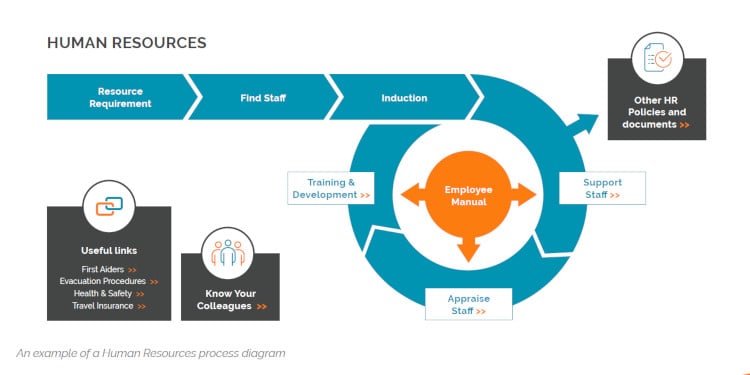
A typical QMS is a set of pages each describing a company process or procedure to ensure a standard and consistent level of business quality. Those pages often contain workflow graphics in the form of flow diagrams. They’re a lot more user-friendly and interactive when presented on-screen within a web browser.
Primilis created two QMS solutions for a couple of existing customers. How best to store these within CogniDox?
The answer is to create them as Web Archive (WA) document types.
By way of background, normally CogniDox allows user-companies to decide what they want to name their document types but there are three special or reserved types that come with built-in functionality. These are:
Example uses for Web Archives are:
Web archives are zip files containing an index.html page at the top level. Once the zip file is uploaded they can be directly browsed from both CogniDox and the Customer View. An example might look like this (note the highlighted index file):

When the zip file is uploaded it is represented by a Zip icon as the master file and a HTML icon as the ‘derived’ file. When a user clicks on the HTML icon it opens the entire package as a web site within the same browser that’s being used for CogniDox, with the index file as the home page. The user can then follow any links that have been coded in the HTML.
The WA file is like any other document – you can call for reviews and ultimately it can be approved and published. When it is published it can be licensed to appear on a customer portal and again there it will display as a set of web pages,
There’s a certain elegance to the fact that one of the controlled documents is itself the entire company QMS.
The city council in Freiburg, Germany found itself at the centre of controversy last week when it told the world it wasn’t happy with the open source office suite OpenOffice and that it wanted to return to the Microsoft Office suite instead.
When the open source community found out they were using the outdated OpenOffice 3.2.1 (the current release is 3.4.1) and that they didn’t appear to know about the existence of LibreOffice, there was a protest.
At the same time as reading this I was also reading a blog about LibreOffice OOXML improvements in Writer. That’s short-hand for how we’ve made the open source LibreOffice 3.6 Writer word processing application handle Micrsosoft Word’s most commonly-used format in better ways.
LibreOffice, in case you don’t know or remember, forked from OpenOffice at release version 3.3.
The list is impressive. Writer in LibreOffice 3.6 is now better at handling things like smart art graphics, custom font sizes and forms. What was extra-interesting was the links to various test documents that were used to verify the points asserted.
We’ve got an interest in all this for a few reasons, but not least because of the impact on PDF conversion. Our ‘take’ on LibreOffice 3.6 is that it’s certainly better, but still far from perfect with the Word templates we use to test. The changes proposed for LibreOffice 4.0 do look promising, and it has to be said that LibreOffice Draw does a much better job of handling Visio (.vsd) documents.
The German city councillors are not completely wrong. Whether it’s a good enough case to justify the extra costs at a time of austerity is another matter.
We up-issued the CogniDox WordPress Blog Plugin this week.
The key change are support for posting online-editable documents from CogniDox and enabling the definition of replacement strings to be applied in posts.
Here’s how I used it writing this post:
I created a new document type called “BL” for blog post. Feel free to use any 2 letter suffix that isn’t already in use on your CogniDox installation. I made sure to check the Online Editable box which allows me to edit documents of this type using the online HTML editor. I created a new document part, giving it the title “Using the CogniDox WordPress Blog Plugin” and selecting BL as the document type.
Now whenever I select Add Draft or Add Issue, the page will display an Edit Online button next to File to Add, because BL is an online-editable type.
Clicking the Edit Online button launches the rich text editor. I can cut and paste text into the text field. I can add images. I can change the formatting using a range of HTML icons. I can also insert a range of CogniDox metadata types such as the title, part number, version, issuer’s name, and more. Here’s an image that I uploaded from my PC and saved to the CogniDox server:
As I finish an editing session I save my work with the Store button, which returns me to the add draft (or issue) page. I could at that stage send the document to my colleagues for review along with comments, or notify someone that I’ve added it. But when I’m ready I save my work using the Add Draft (or Add Issue) button. Repeat as necessary until all those great points and insights are out of your head and written down in the blog post!
I’ve talked before about some of the practical issues maintaining a blog for a company when more than one person is contributing. In the traditional publishing world there’s a concept known as an Editorial Calendar. At it’s simplest, that could be a list of article titles, name of author and date required-by. But you can go beyond that to add all sorts of metadata such as the theme, tagwords, target audience, conversion goal and so forth. The blog “commissioning editor” could create a number of CogniDox part numbers, one per blog article, and delegate them to their authors. As each one gets progressed it can be reviewed and ultimately approved for publication.
When this blog post was ready, I promoted my latest draft to an issue and approved it.
From the actions menu on the document details page for my blog article I selected the “Send latest approved version to WordPress” action. It displays the format for me as it will appear on WordPress and if I’m happy with that, I publish.
What we also did this week was extend it slighly for another customer so they can publish news articles. Like many companies these days they’ve contructed their public website using WordPress as the CMS and there’s a section on there for News. Each article has a title, an image and a summary of the article. Click on the title and it displays the full article in a new page. It took a change to the online editor: insert a horizontal line where you want the summary to end, usually at the end of the first paragraph, and it works out how much of the article to display in the summary view and puts the rest into the full body of the article.
Again, an easy and pain-free way to manage an article from inception to publication, with far less danger of sending the wrong version or putting the wrong text with the wrong image.
Anything that streamlines the process of generating content allows more time for actual publishing. And we all know the SEO value of good content.
SkyDrive is Microsoft’s revamped cloud service for collaborative document writing. It compares and competes pretty directly with Google Docs, in that you use it to author documents; and that makes both of them different from the various cloud-based document sharing sites. You need a Microsoft account (formerly “Windows Live ID”) to try it, but hey who hasn’t got an old Hotmail login lying around from 2001? I’m joking of course; it too has undergone a recent big makeover.
Google Docs has had a good share of my time when people have sent me links to documents. Mostly it’s been fine. Larger documents can be an issue sometimes. Often there are formatting issues when the file comes from e.g. PowerPoint 2010 and it is converted to the corresponding Google Docs format. To get something looking right often takes a couple of extra steps. Given that so many people start their work in Microsoft Office (or it needs to end up there), this can be a pain. But it’s true that it’s getting better all the time where format fidelity is concerned.
Both SkyDrive and Google Docs have the same purpose. You and other collaborators can work on a document at the same time because the file is stored in the cloud rather than on anyone’s hard drive.
One of the nice features of SkyDrive is that in addition to reading and editing e.g. a Word file in your browser using a scaled down tool called the Word Web App, you can opt to open the file into Word on your computer.
If you download the file into Word from SkyDrive and make local changes it will save the file back to the cloud service (to https://d.docs.live.net/…). So people can work online in the browser or offline in Word and all their changes will be synchronised – in the case of offline users that happens when they connect again.
And now that Google Docs is morphing into Google Drive, it can do something similar. You can’t do the open in Word / PowerPoint / Excel feature. Instead you have to download it and re-upload any changed version manually.
Now, you might think because SkyDrive or Google Drive provide online document file sharing they are alternatives to CogniDox as a document management system. When we demo CogniDox or train new users they sometimes tell us that their “previous company used Google Docs for that”. There’s clearly room for confusion.
But there is a scenario that shows CogniDox working in tandem.
Imagine I’m working on a shared document with people outside my company. It could be a new marketing brochure and I’m getting assistance on writing it from an external consultant. We need to work on the document together so we create or upload it on SkyDrive. But I also want to keep my co-workers informed on progress of the document and may ask them to review it at critical stages. I certainly want to get it approved by the Head of Marketing when it’s done.
One way is to create a document part in CogniDox. When I then create a draft or issue there is an option to use a URL rather than upload a file into CogniDox. This is what it looks like:

As you can see, all I need to do is cut & paste the URL of my SkyDrive document into the remote URL field on the CogniDox page. I have all the usual options at that point (e.g. to ask for a review) or I can confirm using the Add Draft or Add Issue button. [Note: permission to add remote URLs is controlled by a user right and by document type – rights assigned by an Admin]
The document details page then looks like this:

When I click on the web link, a new window or tab takes me to the document in SkyDrive. There, I (and my co-editor) can make changes in the way described above.
There are limitations. I have to manually create new versions to indicate when I’m up-issuing a draft and that’s a matter of judgement. Typically there would be lots of minor changes (versions) in the SkyDrive file and when those changes are significant enough I’ll update my co-workers via a CogniDox new version. The link remains the same.
But I do have all the review and approval workflow options available to me as CogniDox actions. The fact that I’m working on this is in the company DMS, and the version history (including review comments) will become part of our plan of record should an external Auditor ask for proof of it.
Another thing you can do is this: when you open the SkyDrive file into Word, Excel or PowerPoint you can use the CogniDox Office add-in to save that file back into the CogniDox repository. This would make sense at the end of your joint-authoring, when perhaps you’d prefer to have the brochure document on your server and delete the copy on SkyDrive. You can go on to publish the brochure using the CogniDox licensing and publishing features.
I also think this example makes another point: a lot of web applications claim support for “document management” when really they support file sharing. For me, document management requires at least the workflow and auditability extras that I’ve discussed in this example.
We released CogniDox 8.6.0 over a week ago now.
There is an article on Cambridge Network and a press release describing the ‘headline features’, which are adding support for workflow “routing rules” and an integrated online rich text editor for XHTML files.
These are headlines because they took most effort and may interest someone who isn’t currently using CogniDox in their company.
Here, we pick out a few other features new in 8.6.0 that will be interesting to the Cognoscenti already using CogniDox. The new release contained over 20 changes directly requested as product enhancement tickets, and these are typically practical suggestions that improve the way CogniDox is used on a daily basis.
There’s no way to rank these by priority, so here’s a selection:
Company Categories
If a company has a large number of employees and many business units then the category structure on the CogniDox homepage can become very detailed. In 8.6.0 a Company Categories portlet is available that allows Administrators the ability to show selected categories in a portlet. Categories up to two levels deep can be shown in the portlet, and top level categories can be ‘pinned’ so that all of their sub-categories are shown.
Approval – Confirm Rejection
It’s annoying if someone incorrectly rejects a document approval request because then a new issue has to be created and re-submitted. A new workflow option ‘Require confirmation before approval rejection’ is provided to show a popup confirmation before an approval request is rejected; thereby reducing the chance someone accidentally rejects a request.
Reminders
Email notifications help, but often you still have to remind others to do their review or approval actions and chase them until they do – regrettable but true. A new action called ‘Reminder Emails’ is now available on pages containing lists of documents. You can select a set of documents and send email reminders to all users with outstanding review, approval and/or view policies on those documents. This is for those situations where you need to chase people for a project deadline.
Document Policy Reminders
Companies that need to comply with regulations such as Sarbanes-Oxley have policies that every employee must acknowledge they have received and understood. Sometimes these policy documents are presented once; sometimes they have to be re-presented on a ‘rolling’ schedule. View policies can now be made ‘rolling’ when assigned to a document. A rolling view policy’s due date will automatically increment, meaning the policy will never expire. Ideal for cases where you need to ensure new starters and existing employees keep up to date on a set of documents.
Auditing
Some more information is now kept in the audit trail records: approval and new version notification emails are kept in the event log; promotion of latest draft to issue is logged in the document change history; and review answers (accept, decline, updates required) are logged in the change logs.
Watching Categories
Users can now watch for review meetings, external feedback and PDF upload events in categories.
Recently-created Documents
A new portlet is available showing documents that a user has created recently. Just what’s needed to remind you what you were working on before you went away on holiday.
Manage Licensees
When a user enters information about a Licensee in the Create and Edit Licensee forms, selected fields can be made mandatory and must be completed before the licensee can be updated. This can help you do things like ensure a licensee has a signed and stored NDA before being granted access.
Extranet
Document meta-data is now exported to the licensee server by default in order to allow extranets to use meta-data fields. Used in conjunction with the embedded documents on the extranet, you can now manage page content on the extranet with the added bonus of CogniDox review and approval workflows.
∞
We’ve also made quite a few minor changes that improve usability. The measure of success for these is that you won’t notice them, so I won’t go into detail. There are security changes that make the tool more resilient to e.g. CSRF security attacks. There are some performance tweaks.
There are also new changes that are best described as enabling technologies for future features (built by us or by you using the CogniDox source code provided). I’m referring here to support for the JSON format using a new JSON/JSONP API, which can be used to access category or document data, advanced search results, or quick search of part numbers and titles.
All CogniDox user companies will have received an email from us telling them how to download the 8.6.0 release from the Support website. There is also a useful video there (VI-402389-TM) showing the process of upgrading a CogniDox system from one release to another. It covers downloading an update, uploading the update onto the CogniDox server, extracting and then running the update.
One open source software technology that’s impressed us recently is Piwik. This is the open source alternative to Google Analytics (GA). We’re not alone on this: as of June 2012 vital statistics were 1 Million downloads and more than 300,000 websites using Piwik for analytics. Does Piwik provide the same features as GA? Is it right for you? Judge it for yourself by watching their promo video on YouTube.
Piwik as an alternative to GA attacks the myth that the main value of open source is “Free”. After all, GA is free for the majority of users unless you sign up for Google Analytics Premium. To someone with the free mind-set, there wouldn’t be a case for building the Piwik project.
The important value of open source is “Open”. It breaks out into two benefits. The first is we are free to study the code and decide how best to integrate. In fairness, any good API could achieve the same result, even with closed source software. The other benefit is flexibility (freedom) to deploy in any way required. GA is only available as a hosted service. We could talk about privacy here, and maybe you are “just licensing” your web analytics data to Google (or Yahoo, Facebook, etc.) to use, but are you sure you want to do that? The price for your free service is that you grant expansive usage rights to your data. You can of course opt out, if you know how.
There’s a data availability issue too. What if instead of choosing GA you’d opted for Yahoo Web Analytics? From the end of August 2012 your data would be read-only and you’re advised to remove the analytics tags from your website. You have only more 2 months to view your “historical data”.
All of these are important issues, but many times we act pragmatically and we use the service anyway. The benefits are just too good to ignore.
But the big attraction for us in Piwik is that it can be installed behind the Firewall and dedicated to monitor usage statistics from specific Intranet or Extranet web sites. It’s exactly as if you could download the PHP or other code that makes GA work, and use it the way you want to as part of a project.
We didn’t dwell too long on considering it, but imagine if we set out to re-create all the functionality that a tool such as GA entails. Instead of re-inventing the wheel, the correct approach is to find the best existing open source project that does what you need, and then exert your efforts integrating it. The left-over time can be used to improve the open source code base, and naturally you contribute this back to the project.
So we’ve written a Piwik tracking plug-in for CogniDox 8.6 that allows CogniDox usage and downloads to be tracked by an intranet Piwik.
How does the CogniDox / Piwik integration work? Let’s say we want to collect analytics (page views, downloads, time on site, etc.) from an internal web site that we’ll call cognidox.acme-inc.lan and from a customer-facing site we’ll call support.acme-inc.com. Piwik is installed on our web server (so we now have e.g. piwik.acme-inc.lanas a URL).
Configuration requires adding the website names in Piwik and adding the Piwik URL in CogniDox. The plug-in generates a JavaScript tracking code that you cut and paste into a CogniDox file.
Once you’ve done that, the plugin provides very useful functionality. If you’re tracking internal usage, you can see the most downloaded files on the site, and perhaps set up a goal for a particular document you want people to view. On the Extranet, tracking the most popular downloads is beneficial along with making sure users are successfully finding content. Tracking the technologies used by clients is also useful so you can determine how to develop the Extranet without locking out users.
To go back to the privacy topic we raised earlier, a major benefit with Piwik is that we can use it to track user logins with downloads; to see if a particular user has downloaded a document. Google’s privacy policy is written for the public Internet and would strictly prevent this, but it is a valid thing to do in a private environment such as an Intranet or Extranet. As you own the data with a self-hosted Piwik system, this is not an issue.
As far as we can tell, this is the first instance of using Piwik with a document management system. Certainly there are no other DMS examples on the Piwik integration page . That seems strange, given the obvious value to any company of analysing document utilisation, but it appears to be the case.
We’re looking forward to working more with Piwik. If we can help any CogniDox customer to get up to speed quickly with its use, give us a call.
Gartner published one of their Hype Cycle reports for CRM Sales a few days back. There’s a useful summary on the Forbes site.
The title of the article (“Sales Turns to the Cloud for Quick Relief”) gives a good pointer to the main conclusion. Apparently around 35% of the CRM market is now SaaS / Cloud based, and it’s the fastest way to go if you want a CRM.
There are two statements in the report that caught the eye, namely “SaaS-based CRM sales within enterprises are expected to reach $4.48B in 2012″ and “There are 3.8M Sales Force Automation SaaS users globally today”.
It’s not abundantly clear what constitutes SaaS based CRM but a quick bit of math would suggest that $4,480,000.000 / 3,800,000 means the average revenue per user is $1,179 per annum (or $98.25 per month). That looks plausible based on what I’ve seen of SaaS pricing. Based on the data in the Gartner study, that revenue is mostly going to SAP, Salesforce.com, Oracle and Microsoft.
We use SugarCRM Community Edition 6.5.2 as our in-house CRM although we also provide Plug-ins for some of the others. It lacks nothing (or, at least nothing we need) compared to the feature-set described in the Gartner study. It’s true we run it on-premise and that requires server admin skills, but at a per-user saving of £750 per annum that’s not a problem.
Every day now someone in the business community is talking austerity and recession. Open source enterprise software, People: it’s part of the solution and provides the maximum relief.
During my stint at the Startup Masterclass open mentoring day in Cambridge this week I had a few fascinating discussions about issues facing the Startup founders attending.
One that stood out was a conversation on the pros and cons of adopting a Freemium business model for a software business.
No way can you hear an introduction to a new business and immediately pontificate if Freemium would be of benefit or not, but I did recall an article I’d read recently that tried to come up with a “test” for when Freemium might be the right way to go.
The original blog article by Peter Levine is here: http://pandodaily.com/2012/04/09/what-now-freemium-or-paid/
Let me present the four factors in the test and elaborate a little on what I think is meant by them. According to the article, the Freemium model must offer:
(1)“Phenomenal quality, value, and usefulness”
This is a composite of things really, but the way of testing this for me is the probability by which recommendations of your software product are likely to be spread through the target customer base. I imagine a scene where I meet up with peers and they tell me about the latest CRM tool they are trying out, for example. Or, it might be an entire set of tools such as the Lean Startup Toolkit http://www.cognidox.com/toolkit (sorry, shameless plug), many of which are Free or Freemium.
It’s also crucial that the user experience of using the tool is immediately gratifying. By that I mean that someone broadly familiar with the domain (editing a diagram, managing a project, running a sales pipeline, etc.) can achieve something non-trivial with your software in 15 minutes or so. And that they will be impressed and left feeling more capable by the process. If you have to provide a training course first, it may that Freemium isn’t the right model for your product.
(2) “Access to a very large user base (millions of users)”
Freemium is a marketing tool that enables you to reach a far wider audience than you could otherwise afford with a media advertising budget or an outbound Sales force. However, if your software enables a better or more efficient usage of a specific component in the design of luxury yachts, and is used by a very specialised few, it’s a reasonable conclusion that Freemium isn’t the right answer. It may well be that you offer Free Trials for a period, but that isn’t Freemium in my book.
There’s a time element in this too. Your software product addresses a need now, and in a year’s time that need might be obscured by something Google Drive or Apple iCloud has added to their product (for example). It’s really important therefore that you accelerate the customer acquisition process, even if you have to work out later how to monetise it. There’s a flaw in that logic that should be very apparent to you, but I’ll leave it as-is just to make the simple point about timing.
(3) “A logical way to make money from the free base”
For me, the cardinal error of badly-implemented Freemium models is misplacing the break-point between free and paid-for. There are too many products out there that take an easy option such as the amount of storage offered. You use the free version for say 6 months and love it, but then you realise you are still only using 5% of the storage budget allocated. Only a sense of loyalty or regard for the product would make you upgrade, and I’d rather not have to depend on that in my business plan if I were the company involved.
The better ones allow you to use and benefit from the product, but leave in some annoying characteristic that you’d pay to remove. It could be as simple as watermarking the files created. It might be the awkward way you have to login. If the pivot point between free and paid-for versions falls close to the point between commercial and non-commercial usage, you’re in the right zone for B2B software. For B2C software, it’s far less easy to decide.
(4) “Simple, understandable pricing and experience”
The value of simplicity should be obvious, but there are also discussions among the Freemium community on whether the highest priced version of the product should be on the left or the right hand side of the Pricing web page; and the relative merits of marking one option as “Preferred” or “Most Popular”.
Should you list the pricing at all? I’ve noticed a tendency in the past year that Freemium and Commercial Open Source products are coyer about publishing their prices. This is a backwards trend. Part of me gives them the benefit of the doubt: something in their market or business space has informed them it isn’t a good idea to be so open. But most of me dislikes and regrets it. I liked the way that software product web marketing had moved away from the “Contact Us” style of pricing to a more transparent model. For me, the decision whether to even try a software product is a function of what it does to address my need *and* what it is likely to cost. To do that when software vendors hide their pricing seems impossible. If I have to talk to a Sales person or attend a webinar, I assume the vendor is covering up a high price tag and won’t bother proceeding.
*****
To return to the original question: should I adopt Freemium or not in my Startup software business? This article has at least two points that are crucial: your software must have a large potential user base and be immediately compelling to download and use. A follow-on characteristic is that it must be intuitive to use and leave the evaluator feeling more empowered. Beyond that, I think the other two factors (#3 and #4) are things to consider after you decide to use Freemium, in order to maximise the value you get from doing so.
A few months back we blogged about a resource we created called Tools for Lean Startup Wizards. This consists of two parts:
This post is a sort of mid-term progress report.
The “met expectations” message is that we’ve been refining and adding to the Mindmap. The “needs improvement” part is that writing up the Framework to explain what it’s about and why those tools are important is taking more time than we’ve given it so far.
In the spirit of running lean it seems sensible to share the part that has made progress, so I just up-issued the Mindmap to a new version that captures all the edits made since January 2012.
We *still* haven’t added a visual link to it from the CogniDox homepage, because it’s off-message for what we do with our main products. We need to find a longer-term home for it.
But the link http://www.cognidox.com/toolkit will get you to the latest version. Just click on the Wizard’s hat to view the Mindmap, and from there you have access to the links.
The Cognidox website uses cookies. To read about the cookies in use, or change your cookie settings, please view our Privacy Page.