A good DMS helps high tech and medical device developers manage their information, control their operations, and consistently deliver value to the market.
The core document management features of the Cognidox Lean DMS:
Cognidox supports compliant procedures for information governance. Document control procedures are a crucial requirement of ISO 9001, ISO 13485, ISO 27001, 21 CFR Part 11, and many other standards.
Cognidox has helped many companies automate and formalise document management to achieve their quality goals and streamline their business process. Auditors from certifying authorities have consistently praised Cognidox as among the best document control solution they have seen.
Companies use Cognidox as a place to store information about Audits, Change Control, Corrective & Preventive Actions, Product Quality, Design History Files, Process Mapping, and more.
Business process documents can be routed to users for their action, for instance, for review or for approval, etc. Set up flexible routing rules based on type of request, document type and security profile.
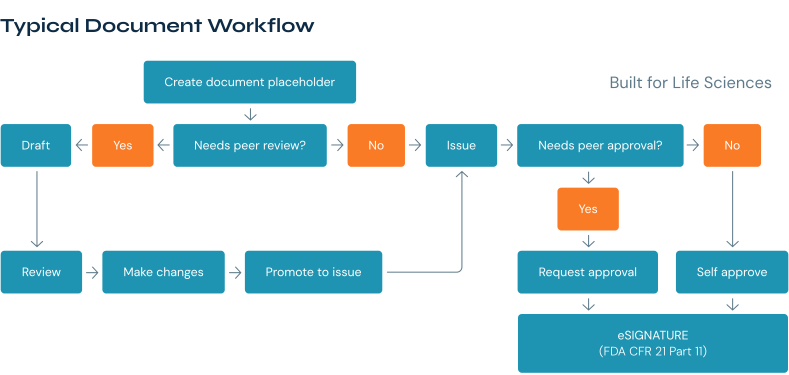
With the Cognidox Lean DMS there are multiple ways to review documents. As well as shared notes, you can provide comments on the document review page and you can upload new files such as tracked changes word documents.
Other review types such as formal review meetings and external feedback are available. It is also possible to check out a document while the reviews are coming in to prevent a new draft from being created.
Cognidox meets the robust version control and auditing requirements of ISO 13485 and ISO 9001, bringing complete traceability to all your quality decision making.
Every draft and approved version of a document is held in the system along with every review comment and approval history.
This function allows teams to add notes to a .pdf of a document. Notes are initially private but once shared they are available to all other reviewers of the document and are saved in the document review history. This allows a document owner to see all reviews in one place.
Authors often need to work on the new document version offline. To help an author with this, Cognidox allows notes to be exported to a spreadsheet that includes the document pages.
Cognidox provides highly flexible approval rules. Users can set up approvers based on categories, document types, or just individual documents. Single or multiple approvers can be established from a pre-defined group. ‘Document holders’ within the system allow whole sets of documents to require approval before release, supporting phase-gated development projects.
Users can approve documents using electronic signatures that meet the rigorous authentication standards of FDA CFR 21 part 11. E-signatures are fully integrated into the Cognidox system and do not rely on expensive third-party plug ins.

In addition to our integrated e-signatures, Cognidox also provides fully featured 'send to DocuSign' functionality. This is great for contract management or in cases where you do not wish to use the inbuilt Cognidox functionality to sign off documents.
You can configure DocuSign signing envelopes directly in Cognidox providing email addresses for the external signatories required. When you ‘Send to DocuSign’ from Cognidox the signed document will automatically be captured in Cognidox when the process is complete.
You can create flexible, user-based notification filters. Automated email reminders can be set up to alert user when document reviews are overdue, provide weekly reminders of outstanding tasks, and more.
Administrators can create HTML forms that can be assigned to categories. Cognidox comes with templates for non-conformance and CAPA forms that you can easily adapt and customise to meet your specific needs.
Forms can consist of any number of administrator-defined fields and rights to create a form can be defined. Users filling in a form will create a new document in the form category.
You can easily create new documents of all types from company-wide or category-specific templates.

Use the Microsoft Office add-in to browse, open and save work directly from Outlook, Word, PowerPoint and Excel. Clone or compare Word documents to save time and see differences between documents ‘at a glance’.
This add-in allows users to work with Cognidox directly from their own favourite desktop tools without having to visit the web interface. Great for user adoption and efficient personal workflows.
Pre-filtering of MS Office files will change both the document properties and the values embedded in the visible document, without requiring a macro or update to change the fields. Mark your document Draft, Approved, include the document part number, etc.
Our lean DMS offers an enterprise search platform for relevance-based full-text search. Users can also search by meta-data and document attributes - perfect for document locate-ability.
Track internal usage of files, with stats around access and download. Cognidox can also provides comprehensive overview of workers’ acknowledgement of critical policies and procedures via dashboard matrices to help ensure compliance with training requirements.
Security profiles applied to document sets or to categories provide very fine-grained control over who can see documents, and what further rights they have to change them. Cognidox helps you meet the rigorous access control and data security requirements of ISO 13485 and ISO 27001.

The search facility sits at the top of the interface at all times and is extremely powerful and quick, and the advanced search facility is excellent.
The system is flexible and can easily be customised to your organisational needs. The price point makes it an option for small companies that could benefit from an eQMS but do not have the funds to go with the more popular packages.
Cognidox is by far the easiest eDMS/eQMS to use and scores with full-equipped access, without the need to buy/install/grant access to different modules. In addition, Cognidox is independent of any file type and does not use third-party "logic", such as MFiles or the like.
Cognidox has transformed our QMS by having one easy-to-use system for all our teams to access, and is saving us time with the manual processes of document control and scheduling.
The entire process from demo, training and implementation has been wonderful. The acceptance of the tool within the organization was very fast and growing by the week! This is a very versatile product and is simple to use. The workflows are very powerful and helps build compliance to several standards with ease.
Cognidox is easy to use and simplifies processes! The support and training provided are fantastic.
The software is very intuitive and configurable. The Cognidox team is friendly and approachable, and understands our needs. All in all, a powerful offering.
Cognidox is a very versatile software, pre-configured for many different Quality Management Systems and yet very easy to use and configure.
Book a no obligation live 60-minute demo and discover if Cognidox is the right fit for your business.
A document management system built for regulated and high-tech teams. It delivers version control, structured projects, reviews, approvals, and release workflows—with audit-ready records and e-signatures.
Scaling med-device/IVD manufacturers, biotech/pharma operations (GxP), CRO/CMO organisations, and high-tech product companies that have outgrown generic file shares and need formal control without bloat.
Cognidox is process-aware. Documents live inside controlled workflows with required reviewers/signers, effective dates, training triggers, and DHF/DMR assembly—so “the latest approved” is always clear.
Yes. Cognidox implements Part 11 controls for identity, intent, record integrity and secure audit trails. When a user approves a record they must confirm their role and reason and re-authenticate (username + password or an approved authenticator app) before the signature is applied. The signature is bound to the exact version and an approval manifest is attached to the record (signer, role, reason, timestamp and a tamper-evident hash), with the full approval history preserved across versions. You can also use the DocuSign integration if preferred; either approach keeps the signed record and audit data inside the DMS.
No — Cognidox supports all common and specialist file types used in product development and regulated work (Office, PDF, video, CAD/ECAD, SolidWorks, AutoCAD, etc.). Administrators can configure allowed file types and apply rules, but the system itself will accept master files and keep them under the same controlled lifecycle as other records.
Upload the master CAD file as usual, and (optionally) attach a PDF view of the drawing. That PDF is what reviewers without CAD tools open in the browser — they can view, comment and participate in workflows — while the master CAD remains the authoritative file under version control.
Yes. Permissions are extremely granular: you can restrict users or groups to only the approved/released version, hide work-in-progress and history, or expose only the PDF rendition while keeping the master file accessible to a smaller group.
You can also create private zones (for example a management area) that are not discoverable unless a user has explicit rights. Combined with role-based sign-off, SSO/MFA and full audit logging, this lets you surface safe, limited views for operators, partners or auditors while protecting master data and preserving a clear audit trail.
Templates are the document blueprints: they enforce structure, required fields and default values (and can carry a pre-filter definition). Recommended titles / naming rules produce consistent, auditor-friendly names and IDs automatically on creation or import. Routing rules, which are applied at the category or document-type level , define the review/approval workflow — who the reviewers and approvers are. Prefilters run at ingest (or when a template with a prefilter is used) and embed data into the underlying record (author, title, part number, etc.), so documents created from a template automatically get that information populated. Together these pieces deliver consistent, predictable records, reduce manual errors, and let admins enforce your SOPs and naming/routing policy for imports, authoring and audits.
Admins archive records by moving them into a restricted/archive area (a private zone/workspace) and changing the record state to Archived/Obsolete. Those archive zones are not discoverable unless a user has explicit rights, so archived items are hidden from normal users and searches. You can, however, grant view rights to specific roles or groups (e.g., records team, management or auditors) so the files are visible only to authorised people. All archive actions (move, state change, who can see) are audit-logged, retention/expiry can be applied, and archived documents can be restored or republished into the live project if needed.
Cognidox is a metadata-driven system that maps easily to category/project structures, so you can import documents into a familiar product/project layout rather than dumping them into flat folders. Admin import tools let you clean and remap metadata, preview a dry-run, and import multiple versions of a document at once (preserving full version history and timestamps). You can map existing folder paths to Cognidox categories, push content into Private Workspaces or pilot areas for validation, and then publish into the live structure when you’re ready. The emphasis is on giving admins straightforward, usable tools so teams get live quickly while retaining traceability and auditability — with migration support available if you prefer hands-on help.
Receive instant blog updates, straight to your inbox
Copyright 2025 Cognidox Ltd | Company Number: 06506232 | VAT number: GB 930970714