Publishing & Collaboration

Control how you publish and share documents with Cognidox - from public eIFUs to secure portals for partners and collaborators.

For high-tech and medical device companies, managing growing volumes of documentation can be overwhelming. Cognidox brings structure and security to your publishing workflows, so you can deliver the right information to the right people, whilst maintaining full control.

From early-stage concepts to product specs and ISO certificates, Cognidox ensures your documents are accurate, approved, and always up to date, whether they're being used internally or by external partners.

Controlled Public Publishing: Share approved documents via public links

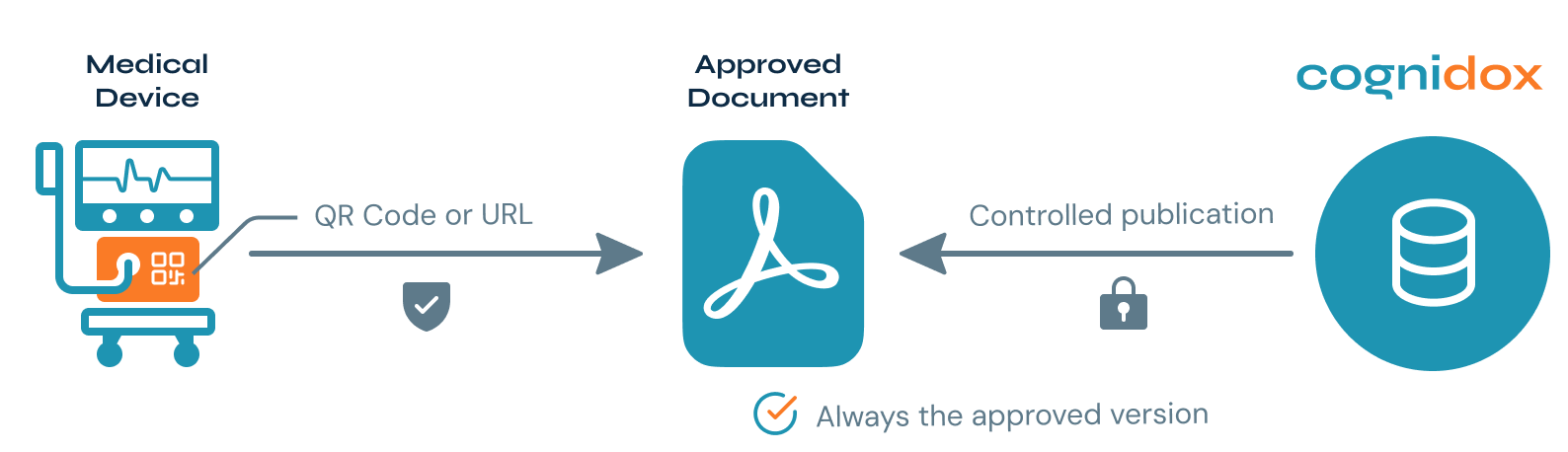
Cognidox makes it simple to publish finalised documents - such as eIFUs (electronic Instructions For Use), datasheets, and ISO certificates - without compromising internal control. Once approved, files can be shared as stable public URLs or QR code destinations. You retain full version control and approval history, ensuring consistency and traceability. If you need visibility into who’s accessing what, you can opt for a secure, login-based portal that logs every interaction at the user level.
Cognidox-Medical-Device-QR-Code-Contolled-Publishing


Learn more about Controlled Public Publishing >>>


Extranet Portal: Distribute documents securely outside your organisation

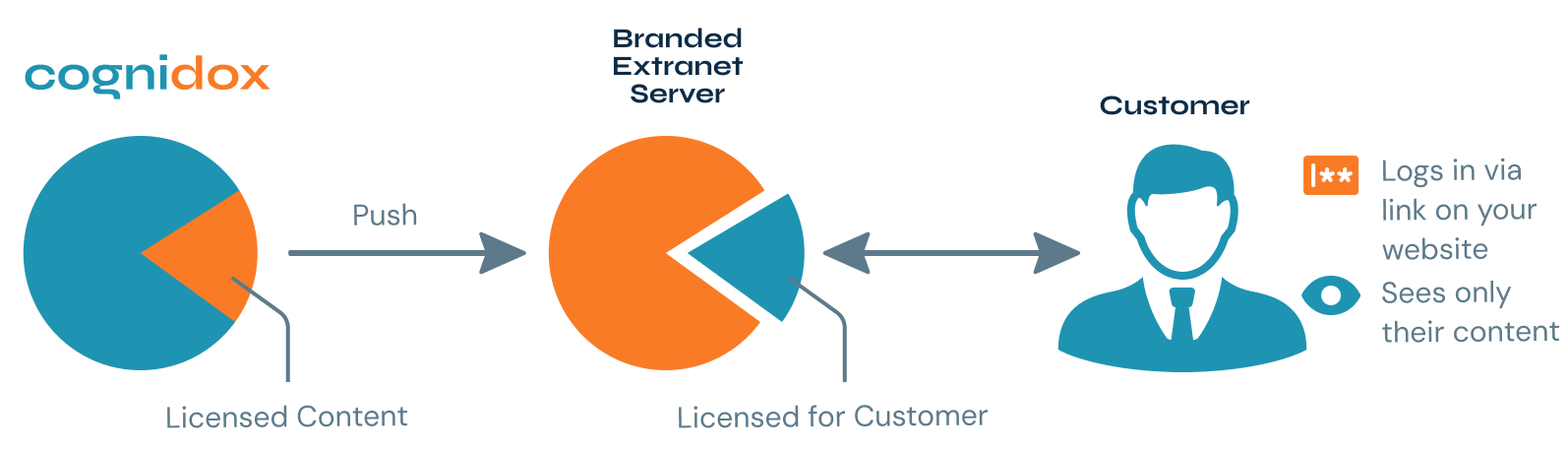
The Cognidox Extranet Portal is a secure, flexible solution for distributing documents to external audiences. Whether you're making materials available anonymously or requiring authenticated access, the portal lets you tailor visibility to suit your needs. Hosted separately from your core system and customisable with CNAME options, it allows you to maintain brand consistency while ensuring secure, traceable content delivery to global distributors, customers, or regulatory stakeholders.
Cognidox-Branded-Extranet-Server-B


Limited Access Partners: Collaborate securely with external users

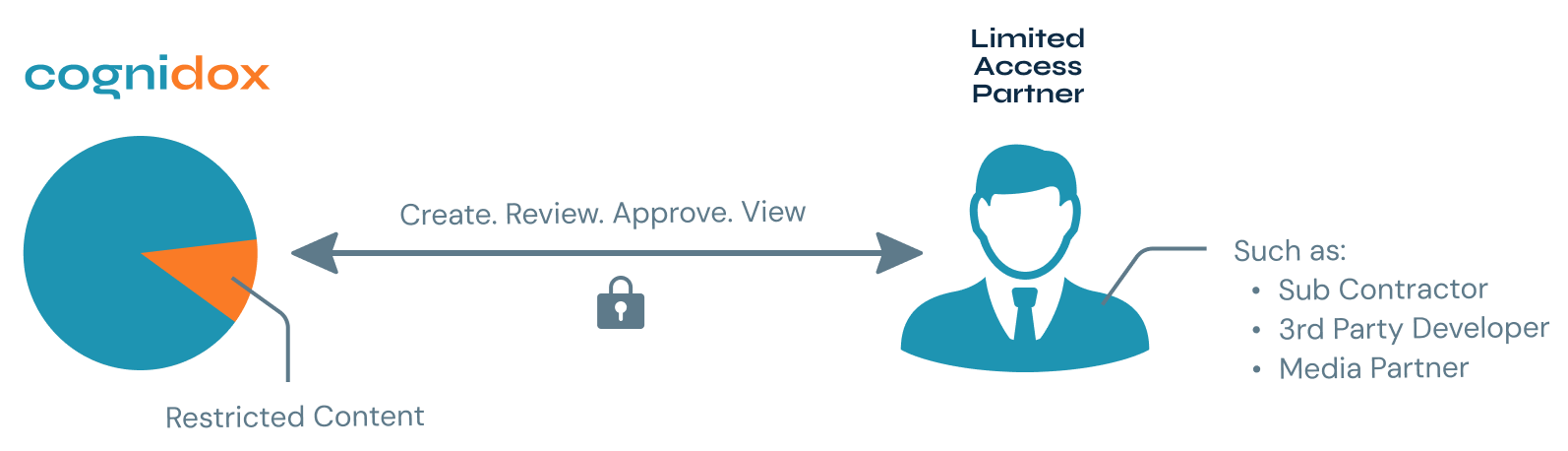
When you need to collaborate with external partners or suppliers, Cognidox provides a seamless and secure environment to do so. Using Limited Access Groups, collaborators can log in to your main system and review, approve, or contribute to specific content, without seeing anything they shouldn’t. You stay in full control of who sees what, while every action is recorded to maintain compliance and transparency throughout your workflows.

Cognidox-Limited-Access-Partner-B

Fostering collaboration in product development

Most high-tech and medical device companies will be working with multiple product lines. In turn, each of those products combines multiple project deliverables, requiring input from numerous functions across the business.

The hardware team may have files created in AutoCAD or SolidWorks for CAD design. Whilst the software team may use Git or JIRA Cloud for the version control of software programs.

Meanwhile, across the office, your technical authors are working with Madcap Flare to produce your user guides. And so it continues across Training, Technical Support - each team operating in its own universe.

And that's where collaboration is key. You can have great teams using the best tools, but still suffer from disconnection within your product development. 


Elimination of silos

Cognidox is the "silo-linker" that solves this problem of disjointedness and gives a Product Release Manager a useful set of tools. Here’s how:

  • It provides a common repository for all the individual specialist tool outputs. In-feeds from mechanical drawing, software development and technical authoring (to name a few) all end up in the same place.

  • It enables a common review and approval workflow across teams and job functions. Dashboard tools instantly let users see the 'health' of a product category, to judge whether it is ready for a “Gate Review” meeting, for example.

  • Document holder files can be used to describe what components make up the product. A document holder is a special Cognidox document type automatically formatted into a web page with links and related information.

  • The Product Manager user role in Cognidox includes features useful for Release Managers. For example, they can build a release configuration where content is tagged with a licence and customers are assigned licences for access entitlement. Licences can be linked to anything that binds a set of customers: product type, geography, service level agreement, generation of product, early adopters, and so on.

  • At product release time, content is automatically copied to the Extranet web portal where it is available for customer download. No more panics at 6pm Friday (always the designated release day!) to "get everything out the door".

  • Download activity by customers is automatically tracked on an individual document level. Analytics like this can give insights into the way individual content (such as a new release of software drivers or a quick start guide) is being consumed.

Simple set-up, seamless user experience

With the Cognidox Extranet there are no “set-up” or “on-boarding” charges. You don’t have to worry about software updates, uptime or other monitoring – we do that for you.

A partner login button on your own website is all you need to make this a seamless experience for external users. And there's no lengthy, expensive “consulting” period, we will customise the look and feel in accordance with your corporate brand within hours. This way, you will enjoy the full value of your Extranet within days.

Don't just take our word for it.

See Cognidox in action

Book a no obligation live 60-minute demo and discover if Cognidox is the right fit for your business.

Some of the most frequently asked questions

Extranet and collaboration

What is the Cognidox Extranet and when should we use it?

Can the Extranet be branded and linked from our website?

How do we publish controlled documents to the Extranet or our public website?

What access and security controls does the Extranet provide?

Can we track customer activity and automate product releases?

How easy is it to get started and maintain an Extranet?

What are Limited-Access Partner accounts (LAP) and when do we use them?

How do LAPs improve partner sign-off workflows (vs. Google Drive / Slack)?

Can external partners upload deliverables or evidence back to us?

Is this suitable for our consultant model and customer collaborations?